Spark with Hadoop on Docker
A production-ready Spark + Hadoop + Hive stack deployed on Docker, aligned with the open-source Spark versions used by Databricks Runtime. Install on any machine in just a few minutes with a single command.
Docker

Apache Spark

Hadoop HDFS

Apache Hive

Shell Script
Introduction
This project Spark with Hadoop Anywhere provides a production‑like Spark + Hadoop + Hive stack deployed in Docker containers that closely mirror real-world Spark environments with one command so that you can develop, test, and demo locally.
Each branch in this project corresponds to a specific Spark / Scala /Java combination (aligned with spark versions used in DBR runtimes), giving you a portable environment for:
- Debugging and developing Spark applications locally without cloud dependencies
- Implement and test new features on third party libraries integrated with spark environment
- Creating/Reproducing issues related to Databricks / Spark OSS
- Unit/Regression testing across multiple Spark versions with ease
- Safe environment for experimentation without affecting shared clusters
Table of Contents
- User Challenges
- Motivation
- Design Goals
- Architecture
- DBR underlying Spark OSS Compatible Branches
- What Makes This Different
- Use Cases
- Getting Started
- Working with the Stack
- Project Layout
- Limitations
- Author
User Challenges
Below are some real-world challanges users face:
Third-Party Library Compatibility
Some libraries work well with open-source Apache Spark but fail on Databricks. How can developers reproduce and debug these issues locally?
Behavioral Differences
How can we reproduce and compare behavioral differences between Databricks and on-premises Spark environments, especially when using Delta Lake or other extensions?
Feature Development and Testing
Developers often need to build new features or integrations (e.g., Delta, MongoDB, Redshift) on open-source Spark and run minimal tests before production deployment.
End-to-End ETL Pipeline Development
How can I implement a complete ETL pipeline—including Airflow, Kafka, and Spark with minimal data locally for experimentation and testing?
Regression Testing Across Spark Versions
If an issue occurs in Spark 4.0.0 on-premises, how can I easily test it locally and verify whether it also exists in Spark 3.5.x?
Learning and Enablement
How can I get a cluster-like local environment to learn Spark concepts and experiment safely?
Motivation
Modern data platforms (Databricks, EMR, on-prem Hadoop) are:
- Version-sensitive: Subtle behavior changes across Spark / Scala / Java versions
- Heavily integrated: Jobs depend on HDFS, Hive Metastore, JDBC sources, cloud storage, etc.
- Expensive to experiment with: Spinning up a full cluster just to debug an edge case is overkill
Typical local setups (e.g., just spark-shell on a laptop or a single generic Spark image) lack:
- A realistic HDFS layer
- A proper Hive Metastore
- Alignment with the exact versions used in production (EMR,underlying Databricks Runtime etc.)
Design Goals
The project is built around these core principles:
1. Version Fidelity
- Every branch is pinned to a specific Spark / Scala / Java combination
- DBR-compatible branches are explicitly documented
- No version guessing or runtime configuration
2. Minimal but Realistic
- Two deployment modes: Single-node for simplicity, multi-node for distributed testing
- Both modes include real HDFS and Hive Metastore semantics
- Enough moving parts to reproduce production issues without excessive cluster overhead
- All core components working together as they would in production
3. Quick Setup
- A single script (
setup-spark.sh) orchestrates build and run for both modes - Simple flags:
--run,--build --run,--node-type {single|multi},--stop - Docker images are buildable from scratch (no opaque base images)
- Easy to share exact environments for bug reports
4. Isolation
- No dependency on host-installed Spark, Hadoop, or Java
- All tooling and config live inside containers
- Clean slate for each version/branch
5. Extensibility
- Easy to add connectors (JDBC jars, Kafka clients, Delta Lake, etc.)
- Easy to fork and create new branches for future Spark/DBR versions
- Straightforward Dockerfile modifications
Architecture
Each branch provides two deployment modes with version-specific artifacts:
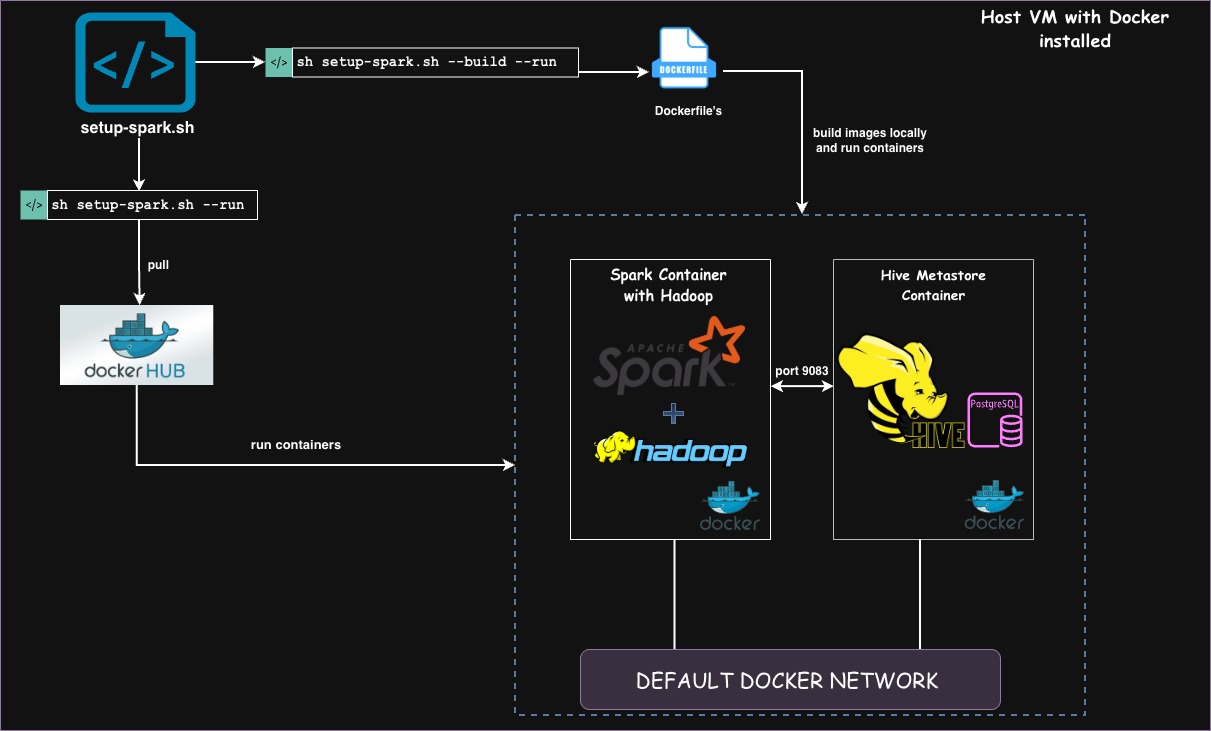
Deployment Modes
Single-Node Mode (Default)
A single all-in-one container with Spark + HDFS + Hive for quick development and testing.
Containers:
- Spark Container: Runs Spark (master + worker), HDFS (NameNode + DataNode), and Hive CLI
- Hive Metastore Container: PostgreSQL-backed Hive metastore
Use Cases:
- Quick prototyping and development
- Learning and experimentation
- Simple debugging scenarios
- Minimal resource consumption
Multi-Node Mode
A distributed Spark Standalone cluster with master and worker nodes for realistic production-like scenarios.
Containers:
- Spark Master Container: Runs Spark master, HDFS (NameNode), and Hive CLI
- Spark Worker Containers (2 workers): Each runs a Spark worker process and HDFS Datanodes)
- Hive Metastore Container: PostgreSQL-backed Hive metastore
Use Cases:
- Testing distributed Spark applications
- Debugging executor-level issues
- Testing resource allocation and scheduling
- Simulating multi-node cluster behavior
Component Details
Spark
- Single-node: Spark runs master + worker on the same container
- Multi-node: Spark master on one container, workers on separate containers
- Spark distributions are wired to the Hadoop client classpath
- Configurable through standard
spark-defaults.conf,spark-env.sh, etc. - Master URL:
spark://hadoop.spark:7077(for multi-node)
Hadoop (HDFS)
- Single-node: NameNode + DataNode in one container
- Multi-node: NameNode + SecondaryNameNode on master, shared with workers
- Backed by container-local storage paths (no external FS required)
- Bootstrapped at startup with format-once pattern and idempotent initialization
- Shared volumes ensure data persistence across containers
Hive
- Hive CLI and Beeline available inside the Spark container(s)
- External Hive Metastore backed by PostgreSQL in a dedicated container
hive-site.xmlconfigured for:- Metastore DB credentials
- Metastore host/port
- Shared warehouse location
DBR underlying Spark OSS Compatible Branches
Branches are curated to align with Databricks Runtime (DBR) and underlying OSS Spark versions. Click on the branch name you want and i will take you to that specific branch in the reprository
| DBR Version | Spark OSS Version | Scala Version | Java Version | Compatible Branch in the Repository |
|---|---|---|---|---|
| 13.3 | 3.4.1 | 2.12 | 8 | spark-3.4.1 |
| 14.3 | 3.5.0 | 2.12 | 8 | spark-3.5.0 |
| 15.4 | 3.5.0 | 2.12 | 8 | spark-3.5.0 |
| 16.4 | 3.5.2 | 2.12 | 17 | spark-3.5.2-scala-2.12 |
| 16.4 | 3.5.2 | 2.13 | 17 | spark-3.5.2-scala-2.13 |
| 17.x | 4.0.0 | 2.13 | 17 | spark-4.0.0 |
Tip: Use the closest match to your target DBR. For binary compatibility (especially for UDFs, UDAFs, and custom libs), ensure the Scala version also matches.
What makes this different from other Repos
There are many Spark Docker images, but this project specifically targets data platform engineers, SREs,support engineers,developers working on real world pipelines involiving data analytcis.
1. Complete Stack, Not Just Spark
- OSS Spark and related library issues
- DBR related spark issues
- HDFS issues
- Hive Metastore state and table metadata issues
2. Version-Driven Branches
- Branches are tied to underlying OSS Spark/Scala/Java
- You don’t pass
SPARK_VERSIONat runtime; you switch Git branches
3. Reproducibility-First Design
- Single entry script:
setup-spark.sh - No hidden global dependencies; everything is in containers and repo
- Easy to zip up as a minimal reproducible environment
4. Pre-built Docker Images
All Spark/Hadoop/Hive combinations are pre-built and available on DockerHub: docker4ops/spark-with-hadoop
- Less setup time: Pull and run in seconds
- Consistent images: Same image works across all machines
- Multiple tags: Each branch has a corresponding Docker image tag
- Always available: No dependency on building from source
Some Use Cases
1. Reproducing OSS VS DBR Behavior Locally
Problem
You hit a bug on DBR 16.4 and need a deterministic environment to:
- Validate if it's an OSS Spark issue vs Databricks-specific behavior
- Isolate a minimal repro without exposing production data
- Iterate quickly without burning cluster compute
Solution
- Check out the branch mapped to
Spark 3.5.2 / Scala 2.12 or 2.13 / Java 17 - Spin up the stack with
setup-spark.sh - Load synthetic/anonymized data into HDFS/Hive
- Run the same job logic and compare behavior
2. Validating Cross-Version Behavior
Problem
Upgrading DBR (or straight OSS Spark) and need to understand:
- Behavior changes in ANSI mode, SQL planner, shuffle behavior, etc.
- API changes impacting your libraries
- Performance regressions
Solution
- Run the same workload against multiple branches (e.g.,
spark-3.4.1vsspark-3.5.2-scala-2.13) - Compare:
- Query plans
- Logs and metrics
- Output correctness
3. Minimal Reproducible Examples (MREs)
Problem
You want to open a GitHub issue or vendor ticket and must provide:
- Exact Spark / Scala / Java versions
- Exact configuration
- Simple dataset + script/notebook
Solution
- Use this repo + branch as the environment contract
- Share:
- Branch name
setup-spark.shinvocation- A small dataset and job script
- Others can clone the same branch and reproduce the behavior exactly
4. Training and Onboarding
Problem
New team members need a safe environment to:
- Learn Spark + HDFS + Hive interactions
- Experiment with different table layouts and partitioning strategies
- Understand Metastore and catalog behavior
Solution
- One command brings up a single-node analytics stack
- Nothing is shared; you can destroy and recreate at will
- Ideal for internal training or "Spark archeology" on older versions
Getting Started
Prerequisites
Make sure you have these tools installed by following the installation steps in the README file and then verify the istallation:
- Docker Engine
- Docker Compose (or
docker-composeplugin) - Git
docker --version
docker-compose version
git --version
Step-1: Clone and Choose a Branch
Choose a branch based on the spark version you want to install , you can refer to the table DBR underlying Spark OSS Compatible Branches and pick the branch based on your Spark version.
git clone -b spark-2.4.7 https://github.com/AnudeepKonaboina/spark-with-hadoop-anywhere.git && cd spark-with-hadoop-anywhere/
Step-2: Configure Secrets (hive metastore password)
mkdir -p secrets
echo "<your_strong_password_here>" > secrets/postgres_password.txt
Step-3: Run the Setup Script
There are two ways of running the setup script, and you can optionally choose between single-node and multi-node deployment.
Cluster Mode Options:
- Single-node (default): A single container with Spark + HDFS + Hive
- Multi-node: Spark master + 2 workers with shared HDFS
Specify the mode with --node-type {single|multi} (defaults to single if omitted)
Option A: Use prebuilt images from DockerHub (fast setup and recommended)
All images are pre-built and available on DockerHub: docker4ops/spark-with-hadoop
# Single-node (default)
sh setup-spark.sh --run

# Multi-node cluster
sh setup-spark.sh --run --node-type multi
This pulls pre-built images and starts the stack in seconds. Perfect for quick testing and development.
Option B: Build images locally
# Single-node (default)
sh setup-spark.sh --build --run

# Multi-node cluster
sh setup-spark.sh --build --run --node-type multi
Build from source if you want to customize the Dockerfile or add additional packages.
This will:
- Build/pull Docker images
- Start containers using Docker Compose (single or multi-node based on your choice)
- Initialize Spark, HDFS, and Hive Metastore
- Verify all services are healthy
Step-4: Verify Running Containers
Once the setup is completed, verify the running containers:
docker ps
Single-node deployment:
You should see 2 containers:
spark- Spark standalone + HDFS + Hive CLIhive_metastore- PostgreSQL-backed Hive Metastore
Example output:
CONTAINER ID   IMAGE                     COMMAND                  PORTS                              NAMES
1af5afd31789   spark-with-hadoop:local   "/usr/local/bin/star…"   0.0.0.0:4040-4041->4040-4041/tcp   spark
c8c3e725a73c   hive-metastore:local      "docker-entrypoint.s…"   5432/tcp                           hive_metastore
Multi-node deployment:
You should see 4 containers:
spark-master- Spark master + HDFS (NameNode, DataNode, SecondaryNameNode) + Hive CLIspark-worker-1- Spark worker #1spark-worker-2- Spark worker #2hive_metastore- PostgreSQL-backed Hive Metastore
Example output:
CONTAINER ID   IMAGE                        COMMAND                  PORTS                              NAMES
18bd26ade9ac   spark-with-hadoop:local      "bash -lc..."            0.0.0.0:7077->7077/tcp             spark-master
973ee17a76e8   spark-with-hadoop:local      "bash -lc..."            8081/tcp                           spark-worker-1
60e52fdc6bc5   spark-with-hadoop:local      "bash -lc..."            8081/tcp                           spark-worker-2
12fcb76b3af2   hive-metastore:local         "docker-entrypoint.s…"   5432/tcp                           hive_metastore
How to use
Connect to the Spark container
Single-node:
docker exec -it spark bash
Multi-node (connect to master):
docker exec -it spark-master bash
Spark
Single-node Mode
Start a Spark shell in local mode:
# Scala shell
spark-shell

# Python shell
pyspark

# Submit a spark job
spark-submit --class com.example.MyApp my-app.jar
Multi-node Mode
Connect to the Spark cluster master:
# Scala shell connected to cluster
spark-shell --master spark://hadoop.spark:7077

# Python shell connected to cluster
pyspark --master spark://hadoop.spark:7077

# Submit a job to the cluster
spark-submit --master spark://hadoop.spark:7077 \
  --class com.example.MyApp \
  my-app.jar

# Control parallelism
spark-shell --master spark://hadoop.spark:7077 \
  --executor-cores 1 \
  --total-executor-cores 2
Access Web UIs
- Spark Application UI:
http://localhost:4040(when app is running) - Spark Master UI (multi-node):
http://localhost:8080 - Spark History Server:
http://localhost:18080
HDFS
Use the HDFS CLI inside the container:
hdfs dfs -ls /
hdfs dfs -mkdir -p /user/$(whoami)
hdfs dfs -put /opt/data/sample.parquet /user/$(whoami)/
hdfs dfs -cat /user/$(whoami)/sample.parquet | head
Hive
Use Hive CLI or Beeline:
# Hive CLI
hive

# Beeline (JDBC)
beeline -u jdbc:hive2://localhost:10000/default
Example queries you can run:
-- Create a table
CREATE TABLE IF NOT EXISTS employees (
  id INT,
  name STRING,
  department STRING
) STORED AS PARQUET;

-- Query from Spark
SELECT * FROM employees LIMIT 10;
Extending the Stack
Common extension patterns:
Add Custom Jars
# Extend the Dockerfile
FROM anudeepkonaboina/spark-hadoop-standalone:spark-3.5.2

COPY custom-jars/*.jar ${SPARK_HOME}/jars/
Mount Host Directories
# docker-compose.yml
services:
  spark:
    volumes:
      - ./data:/opt/data
      - ./jars:/opt/jars
Add more services to extend the stack
Yonu can add more data egineering services to the docker-compsoe file and build a complete End-to-end data eng tech stack on Docker
services:
  spark:
    volumes:
      - ./data:/opt/data
      - ./jars:/opt/jars
  kafka:
       --
  hbase:
       --
  airflow:
Project Layout
spark-with-hadoop-anywhere/
├── docker-compose.yml          # Multi-node orchestration
├── docker-compose.single.yml   # Single-node orchestration
├── setup-spark.sh              # Entry script (supports --node-type)
├── spark-hadoop-standalone/
│   ├── Dockerfile              # Spark/Hadoop/Hive image
├── hive-metastore/
│   └── Dockerfile              # Hive Metastore image
├── configs/                    # Shared configuration files
├── scripts/
│   └── start-services.sh       # Service initialization script
├── secrets/                    # (Git-ignored) secret files
Limitations
- Not a production deployment template: No HA, no automatic replication, no built-in security hardening
- Limited scalability: Multi-node mode simulates distributed behavior but is not suitable for large-scale performance testing
- Resource constraints: Runs on a single machine, so total compute/memory is bounded by host resources
- No direct Databricks features: DBR-compatible at the Spark OSS level only, not the Databricks control plane, notebooks, or Unity Catalog
- No cloud-specific integration by default: No opinionated integration with S3/ADLS/GCS out of the box (though you can add it via configuration)
- Development/testing focus: Designed for debugging, learning, and reproducibility—not production workloads
Cleanup
When you’re done testing, you can stop and remove all containers with a single command:
sh setup-spark.sh --stop
This will:
- Stop all running containers (single or multi-node)
- Remove containers, networks, and volumes
- Clean up resources
Author
Anudeep Konaboina
- GitHub: @AnudeepKonaboina
- Project: Spark with Hadoop Anywhere
If this project helps you debug a tricky Spark/Hive/HDFS issue or reproduce a DBR bug, please star the repository!
© 2025 Anudeep Konaboina | Licensed under Apache 2.0